
Hotkey Trader
Pro
$19/month
or $190/year · 8-day free trial
- Every programmed button with full ATMs
- Breakout OCO, partials, break-even, reverse
- Profit cap and balance stop
- Journal, achievements, shortcuts
- Copy trading to 1 follower account
Chrome extension for the Tradovate web trader (trader.tradovate.com)
One tap. The whole trade, handled.
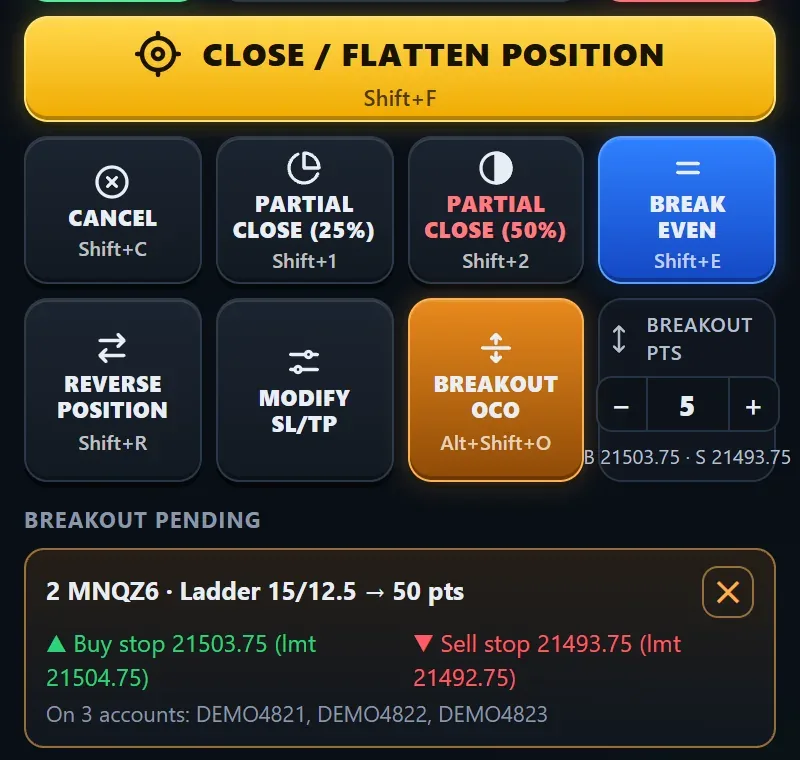
Hotkey Trader adds a pad of programmed buttons next to trader.tradovate.com. Each button does in one tap what Tradovate's basic buttons leave to you: enter with a full ATM, place a Breakout OCO on both sides, take a partial and trim the brackets to match, and copy it all to your other accounts.
8-day free trial on Pro and Pro+ (card required, cancel before it ends and you aren't charged)
What it does
Buy or sell market, bid/ask or a limit a set distance away, with your ATM attached: several targets and a runner, a stop, then break-even, lock and a ratcheting trail that move those orders as price runs.
A buy stop above and a sell stop below as one OCO. The side that fills gets your ATM and Tradovate cancels the other. If a stop can't be placed, the position is closed.
Partial close (25% and 50% by default) shrinks the stop and target legs too, furthest targets first, so the brackets always match what you still hold.
A profit cap closes a trade at a dollar amount; a balance stop closes everything and blocks entries at a balance you choose. News countdown chips warn before CPI, FOMC and jobs data.
Tick the accounts on your Tradovate login and switch Copy on: each one gets its own order and its own ATM bracket, break-even and trail. Pro copies to 1 follower account, Pro+ to up to 10.
Every round trip is journaled from its fills with the ATM used. Every button also has a remappable keyboard shortcut, and live trading stays off until you allow it.
Get started
Install Hotkey Trader from the Chrome Web Store.
Open trader.tradovate.com and the Hotkey Trader side panel.
Pick an ATM, test on a demo account, then trade from the pad.
Pricing
Prices in US dollars. Sales tax is added at checkout where it applies.
Hotkey Trader
$19/month
or $190/year · 8-day free trial
Hotkey Trader
$34/month
or $340/year · 8-day free trial
Hotkey Trader
$149one-time
Free for 8 days, then your plan
8-day free trial on Pro and Pro+ (card required, cancel before it ends and you aren't charged)
Good to know
Community
Ask the people who use it.
Questions, setups and support happen in the Quant Trading Pro Discord, with channels for every product.
Join the DiscordHonest by default
No made-up reviews and no profit screenshots. Real customer quotes appear here with their permission.
Pro is $19 a month or $190 a year; Pro+ is $34 a month or $340 a year. Both start with an 8-day free trial. A one-time Founders license ($149, limited) gives Pro+ for life.
Yes, but live trading is off by default. Orders on a LIVE session are blocked until you switch on "Allow live trading" in Settings. Test your setup on demo first.
Yes. Close, Flatten and Cancel keep working without a plan, so you're never stuck in a trade.
No. Hotkey Trader is an independent tool and isn't affiliated with, endorsed by or supported by Tradovate or NinjaTrader.
Full documentation lives on the product's own site: hotkeytrading.com.
Newsletter
Product updates, new strategies and guides for prop and algo traders. No spam, unsubscribe anytime.