

 QTP Arena
Copy Trade guide
How to Copy Trades Between Prop Firms on Tradovate
Running evaluations at more than one prop firm means placing every trade two or three times. This guide shows how to trade once on one firm's Tradovate account and copy it to your accounts at other firms automatically, without paying for a trade copier.
Updated October 16, 2026 · 6 min read
Why Tradovate group trading can't copy across prop firms
Tradovate has a built-in group trading feature, and many prop firms point you to it. It places one order on several accounts at once, but Tradovate says it only works between accounts with the same provider, such as two accounts at the same prop firm. It also doesn't support ATM brackets (Group Trade vs. a trade copier).
Every prop firm gives you a separate Tradovate login. Your Lucid accounts live in one login, your Apex accounts in another, your Tradeify accounts in a third. Group Trade can't link accounts across them, so it can't copy a trade from Lucid to Apex.
To copy between firms you need a copier that works across logins. Most are desktop or cloud apps. Copy Trade for Tradovate does it inside Chrome, for $20 a month after an 8-day free trial.
What you need
- Google Chrome on a desktop or laptop
- Two or more prop firm accounts that trade on Tradovate (for example Lucid Trading, Apex Trader Funding, Tradeify or MyFundedFutures)
- The Copy Trade for Tradovate extension
Step-by-step setup
Install the extension
Add Copy Trade for Tradovate from the Chrome Web Store. It only runs on trader.tradovate.com.
Open each prop firm in its own tab
Log in to your first prop firm's Tradovate account in one Chrome tab and your second firm's account in another tab. The extension keeps separate settings for each login.
Set your main account to Lead
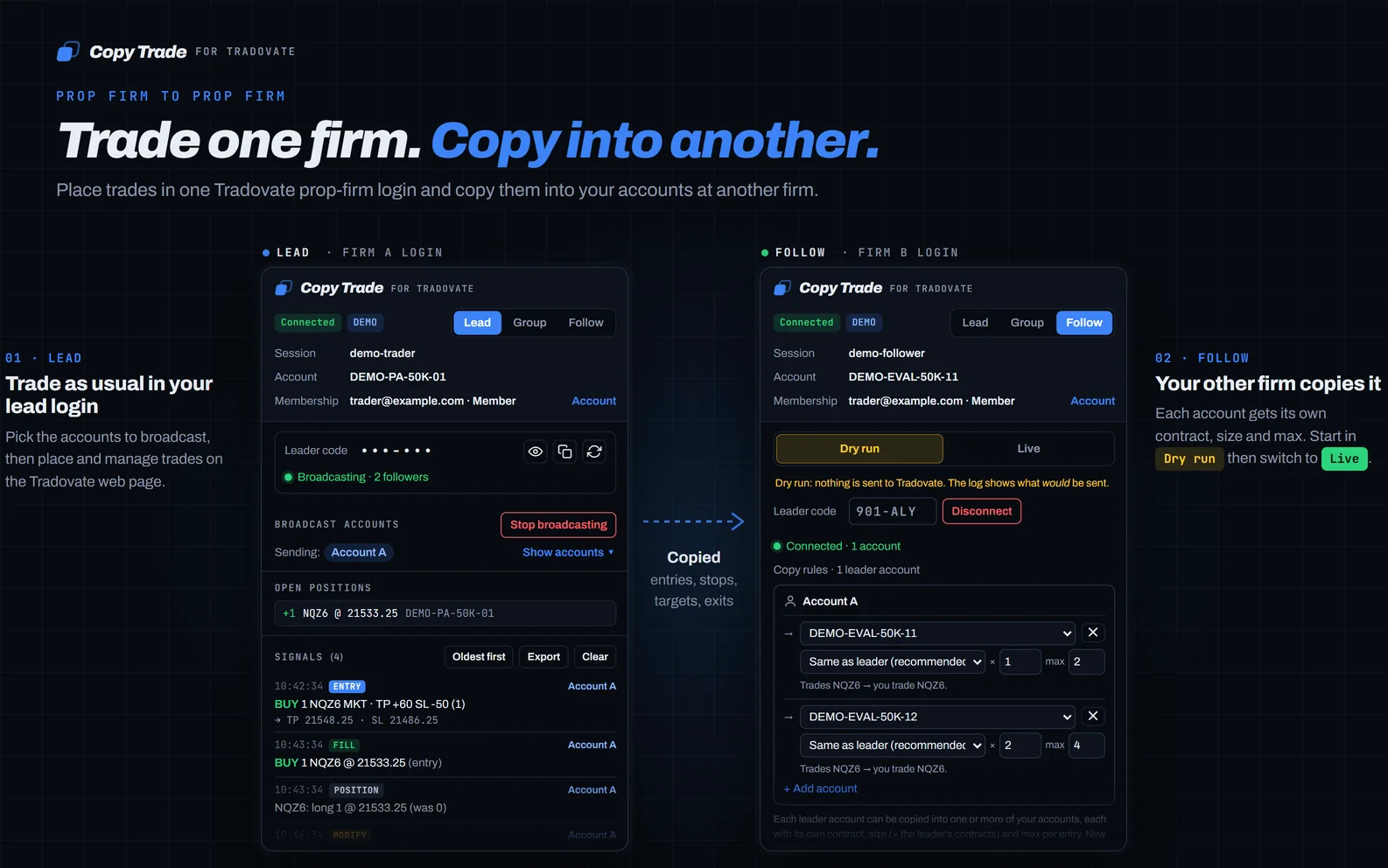
In the tab you'll trade from, open the side panel, choose Lead, pick the accounts to broadcast and copy your private leader code.
Set the other tabs to Follow
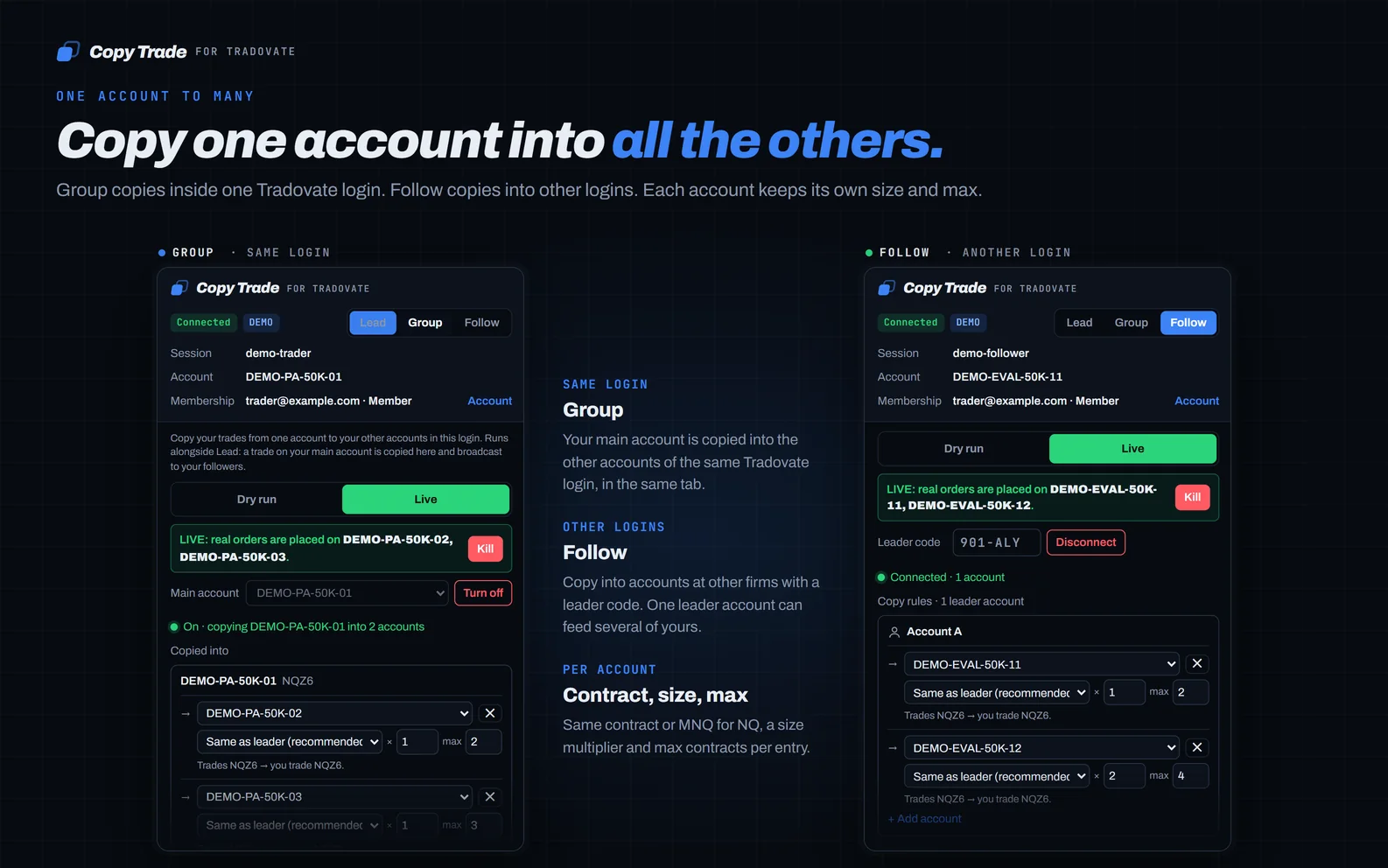
In each other tab choose Follow, paste the leader code. Each leader account gets a card: choose which of your accounts it copies into with Copy into, and use Add account to copy the same trades into more of your accounts at that firm.
Size each account for its firm's rules
Each account you copy into has its own contract, size multiplier and maximum contracts per entry. Prop firms have different drawdowns and contract limits, so a 50K account at one firm may need a smaller size than a 100K account at another.
Test in Dry Run, then go Live
Dry Run shows the orders that would be sent without sending them. Place a trade in the lead tab and check the follower's activity log. When it looks right, switch the follower to Live.
What gets copied
- Market, limit and stop entries
- Stop-loss and take-profit brackets, including Tradovate ATM templates
- Stop and target moves
- Order cancellations, exits and flatten
Copying holds up through interruptions too. A quick refresh of a Tradovate tab keeps Live on and catches up on what the leader did meanwhile. If Chrome restarts or puts a tab to sleep during a trade, new entries pause, but the open trade's exits are still copied.
You can also trade a different contract on the follower, for example the leader trades MNQ and the follower trades NQ. Stops and targets are copied when both contracts are in the same market.
Tips to avoid breaking prop firm rules
- Never copy in opposite directions. Every firm bans hedging, meaning long on one account and short on another in the same or a correlated product.
- Only copy between your own accounts. Most firms ban copying another person's trades, even if the copier supports it.
- Check whether your firm limits which copiers you can use. Some firms only allow copiers from an approved list. See our prop firm copy trading rules comparison.
- Watch news rules. A trade that is fine at one firm can break another firm's news rule.
- Keep Tradovate tabs awake. Add trader.tradovate.com to "Always keep these sites active" in Chrome's performance settings.
Limitations to know
- Live copying currently works on Tradovate demo sessions, which include simulation and most prop firm evaluation accounts. Dry Run works everywhere.
- Leader trades must be placed in the Tradovate web trader tab. Orders from TradingView or the Tradovate mobile app aren't copied yet.
- The leader and follower accounts must be in different Tradovate logins.
- Fills and prices can differ slightly between accounts.
FAQ
Can Tradovate group trading copy trades between prop firms?
No. Tradovate says Group Trade only works between accounts with the same provider, such as two accounts at the same prop firm. Accounts at different firms can't be grouped, so you need a copier that works across logins.
Is there a simple way to copy trades between prop firms on Tradovate?
Yes. Copy Trade for Tradovate is a Chrome extension ($20 a month, 8-day free trial). One tab leads, the others follow.
Do prop firms allow copying trades between my own accounts?
Most do, with conditions. Some only allow approved copiers, some ban automation, and all ban hedging across accounts. Compare them in our copy trading rules guide.